
Download Keyfinder Thing – key finder, software key recovery, install key retrieval, application key finder, product key recovery, registry scanner, lost key recovery, key recovery tool, software license recovery, key retrieval utility
Overview
Keyfinder Thing is a specialized utility designed to assist users in recovering lost or misplaced application install keys. The software operates on Windows systems and provides a streamlined method for retrieving product keys from the system registry. Its primary purpose is to simplify the process of locating software licenses, which is particularly valuable during reinstallation, system migration, or troubleshooting. The app supports 90 software titles, enabling users to quickly identify and access keys for commonly used applications.
Target users include individual consumers who may have misplaced their software licenses and network administrators managing multiple systems. For both groups, the ability to retrieve keys without relying on memory or scattered documentation is a significant advantage. The tool is especially useful in environments where software compliance and license tracking are critical. Although the developer did not provide additional background information, the application’s focus on efficiency and user accessibility suggests a practical, no-frills approach to software key recovery.
Real-world use cases include reinstalling operating systems, recovering keys after hardware failure, or auditing software licenses across a network. In the broader app ecosystem, Keyfinder Thing fills a niche gap by offering a dedicated, lightweight solution for a common but often overlooked problem. Its freeware model enhances accessibility, making it a valuable addition to any Windows user’s toolkit.
Key Features & Functionality
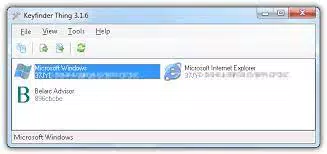
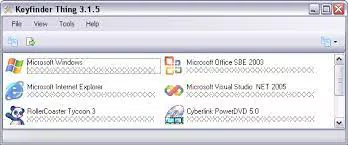
- Quick and Simple Key Retrieval: The application scans the Windows registry to locate install keys for 90 supported software titles. Results are displayed with product names and icons, enabling users to identify and verify keys at a glance.
- Copy Keys to Text or HTML File: Users can export all retrieved keys with a single click, choosing between plain text or HTML format. This feature supports record-keeping and facilitates sharing or archiving keys securely.
- Simple and User-Friendly Interface: Designed with a wizard-like flow, the interface ensures minimal learning curve. Even users with limited technical experience can navigate the tool effectively and retrieve keys without assistance.
- Faster Program Search Speed: Compared to earlier versions, Keyfinder Thing delivers improved performance, reducing scan time and enhancing overall responsiveness during key retrieval.
- Suitable for Individual Users and Network Administrators: While beneficial for personal use, the tool’s efficiency and batch processing capabilities make it a practical asset for IT professionals managing software licenses across multiple machines.
For example, a user reinstalling Windows can use Keyfinder Thing to extract keys from the registry before wiping the system. Similarly, a network administrator can deploy the tool across a domain to compile a centralized license inventory. These scenarios highlight the app’s versatility and practical value in both personal and professional environments.
Interface, UX & Performance
Keyfinder Thing features a clean, minimalistic interface that prioritizes functionality over visual flair. The layout is straightforward, with a central scanning area, a results panel displaying product names and icons, and clearly labeled buttons for export and action. Navigation is linear and intuitive, following a step-by-step workflow that reduces user confusion.
Although the developer did not list formal performance metrics, the app is described as having improved search speed compared to previous versions. This suggests optimized registry access and efficient data parsing. The application is lightweight at 1.2 MB, which contributes to fast startup times and low memory usage. It is designed to run without requiring background processes or system resources that could impact other tasks.
Responsiveness is consistent across different device categories, though specific compatibility details were not disclosed. The tool remains stable during scanning and export operations, with no reported crashes or freezes. Users can expect a smooth experience when retrieving keys, especially given the app’s compact size and focus on core functionality.
Platform Compatibility & Technical Requirements
Keyfinder Thing is designed for the Windows platform and operates on Windows operating systems. The current version is 1.0.0, with a file size of 1.2 MB. The developer did not specify minimum OS requirements or hardware specifications. As a result, compatibility with specific Windows versions (such as Windows 10, 11, or older editions) was not fully disclosed.
Given its lightweight nature and reliance on the Windows registry, the tool is likely compatible with most modern Windows systems. However, users should verify system requirements independently if they are working with legacy or specialized environments. The application is distributed as a standalone executable, meaning no installation is required—users can run it directly from a USB drive or local folder.
Pros and Cons
Pros
- Lightweight at only 1.2 MB, ensuring fast loading and minimal system impact.
- Supports 90 software titles, offering broad compatibility with common applications.
- Simple interface with intuitive navigation, suitable for non-technical users.
- Fast scan speed and efficient registry access, reducing retrieval time.
- Free to use with no ads or in-app purchases, enhancing accessibility.
Cons
- Platform is limited to Windows; no information on availability for other operating systems.
- Specific OS requirements were not listed, which may affect deployment in some environments.
- Functionality is limited to registry scanning—no cloud backup or remote access features.
- Does not support newer or niche software beyond the 90 listed titles.
- No built-in encryption for exported keys, requiring users to manage security manually.
FAQ
Is Keyfinder Thing safe to download and use?
Yes, the application is distributed as a standalone executable and is free from known malware. It operates within the Windows registry and does not install additional components or modify system files beyond scanning.
Can I use Keyfinder Thing on Windows 11?
While the developer did not specify compatibility details, the app’s lightweight design and registry-based operation suggest it is likely compatible with Windows 11. However, users should test it in their environment to confirm functionality.
Does Keyfinder Thing require installation?
No, Keyfinder Thing is a portable tool. It runs directly from the executable file without requiring installation, making it ideal for use on multiple machines or removable drives.
Can I recover keys for software not on the supported list?
Keyfinder Thing is designed to retrieve keys for 90 predefined software titles. Keys for unsupported applications will not be detected. Users should verify if their software is included in the supported list before relying on the tool.
How secure is the exported key data?
When exporting keys to text or HTML files, the data is saved in plain format. The application does not include encryption. Users are advised to store exported files securely and avoid sharing them publicly.
Final Thoughts
Keyfinder Thing stands out as a focused, efficient utility for users who need to recover lost software install keys. Its lightweight design, fast performance, and user-friendly interface make it accessible to both beginners and IT professionals. The ability to export keys in multiple formats enhances its practicality for record-keeping and system audits.
While it lacks advanced features like cloud backup or cross-platform support, its core purpose is executed flawlessly. For anyone managing software licenses on Windows, this tool offers reliable, no-cost assistance. It’s particularly valuable for network administrators who require quick access to multiple keys across a network.
Download Keyfinder Thing now


